Blueprint
A blueprint is the configuration template from which workspaces are provisioned. It describes everything the Provisioner needs to create a workspace pod: the container image, compute resources, network policy, persistent volumes, environment variables, and any optional services running alongside the workspace.
When a user connects — over SSH, the Console, or the API — the Provisioner resolves the appropriate blueprint, renders it into a values.yaml, and uses it to create the workspace pod in Kubernetes. The blueprint is the single authoritative description of what a workspace looks like.
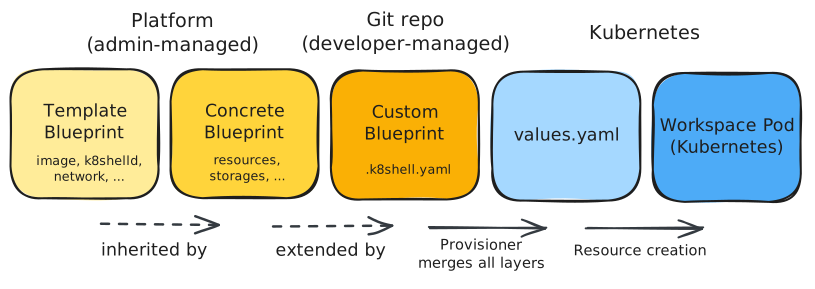
Blueprint types
There are two kinds of blueprint: platform blueprints and custom blueprints.
Platform blueprints are created and maintained by platform administrators. They are stored centrally and represent the standard workspace configurations available to users. A platform blueprint can be concrete — directly selectable by users — or a template, which is marked isTemplate: true and exists only to be inherited from. Template blueprints factor out common configuration so concrete blueprints stay focused on their specific differences.
Custom blueprints are defined by developers, directly in their repositories, in a file called .k8shell.yaml. A custom blueprint always references a platform blueprint as its parent template and can override or extend a subset of its settings. This allows teams to tailor their workspace — adding storage volumes, adjusting compute resources, enabling Podman, running init scripts — without needing admin access to the platform.
Inheritance
Blueprints form a two-level inheritance chain: template → concrete → custom.
When the Provisioner provisions a workspace, it resolves the full configuration by merging layers in order: first the template (if the concrete blueprint inherits one), then the concrete blueprint's overrides, then the custom blueprint's overrides from .k8shell.yaml. The result is a single merged configuration used to render the workspace pod.
The .k8shell.yaml file
A .k8shell.yaml file sits at the root of a repository and contains a single blueprint section. It is authored by developers and committed to version control alongside the code. When k8shell provisions a workspace from that repository, it reads this file and merges the custom blueprint on top of the referenced platform blueprint.
A minimal .k8shell.yaml looks like this:
blueprint:
  template: base
  resources:
    cpu: "4"
    memory: 4Gi
A more complete custom blueprint can specify storage volumes, environment variables, init scripts, and in-workspace apps — scoped entirely to that repository.
For the full field reference, see Blueprint and Blueprint Manager in Provisioner service.